Home Page
Last updated: March 13, 2026
The Home Page serves as your central dashboard, surfacing jobs that require your immediate attention and providing quick access to key financial metrics.
Overview
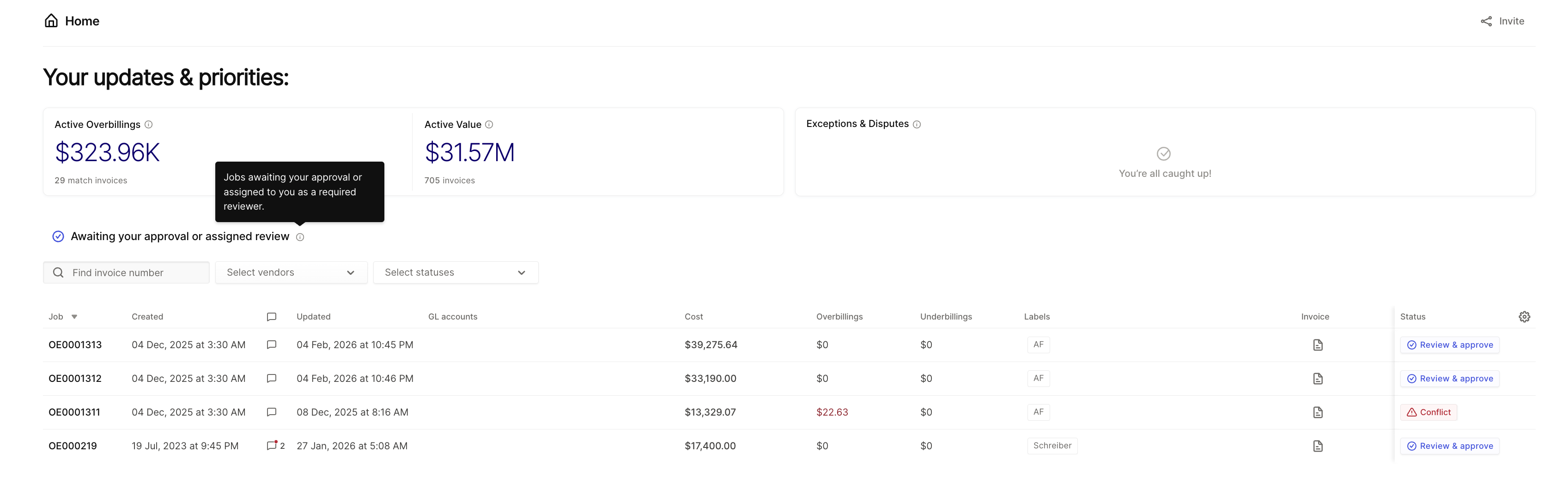
When you log in, the Home Page displays a prioritized view of all jobs awaiting your action—whether you need to approve them or you've been assigned as a reviewer.
KPI Cards
The top of the page displays summary metrics you can drill into:
Active Overbillings — Total dollar amount of overbillings across all active jobs
Active Value — Cumulative value of all active invoices in the system
Click any KPI card to view the underlying jobs contributing to that metric.
Exceptions & Disputes
This section highlights jobs requiring special attention - review expections and disputes on jobs you own or those assigned to your teams.
Allowing you to quickly assess financial impact and prioritize resolution.
Awaiting Your Approval or Assigned Review
This table lists all jobs where:
You are the designated current approver, or
You have been assigned as a reviewer
For each job, you can see the job number, creation date, last updated date, cost, overbillings, underbillings, labels, and current status.
Taking Action
You can approve jobs directly from the Home Page without navigating to individual job details. Use the Review & approve button next to any job to complete your review and move the workflow forward.